


Digital Devices Octopus Twin CI – Double CI Slot
- Created: 2025-02-05 09:50
- Updated: 2025-02-05 10:46
With the rise of digital broadcasting, protecting content from unauthorized access has become increasingly important. This is why many TV providers, whether they are satellite, cable, or terrestrial, encrypt content using Conditional Access Systems (CAS).
A common method used in this process is the Common Interface (CI), an interface that allows Conditional Access Modules (CAM) to connect to the DVB receiver and decrypt protected channels. Decrypting channels with an External DVB-CI adapter provides a flexible headend architecture by separating the receiving and processing parts.
Features:
- Dual common interface (CI) for two CAM modules
- Decryption for all Digital Devices DVB-S2 and DVB-C/T cards
- Common interface (CI) with Multi Transponder Technology (MTD)
- 2 CI slots for two independent CAMS on one socket
- Up to 2 X 4 decrypted pay TV channels
- Only one CAM is required to decrypt 4 encrypted pay TV channels. It supports watching one encrypted channel and recording several encrypted channels simultaneously.
Notice: This function is not supported by all CAMs and providers.
Notice: MTD is currently supported under Windows only.
- Data rates
- > 96Mbit for each CAM and adjustable to the CAM
- Also supports non common data rates < 72 Mbit
- Expandable module system
- Connect to all DuoFlex, Cine DVB cards, and Octopus series
- Cascading of CAMs
- Separate supply voltage for each CAM
- Allows hot pluggable of CAMs
- PCI Express support
- connect via PCIe Gen2 x1 up to x16 slot
- to connect 2 Digital Devices DuoFlex S2 or DuoFlex C/T (max. 4 Tuner)
- or to connect TV cards from other vendors (only single transponder mode, 1 CI = 1 tuner)
- Suitable for very dense cases.
- Brackets with half or full size are shipped together with the card
- Supported operating systems
- Microsoft Windows® XP/7/8
- Linux (Kernel 2.6.34 and higher)
- Supports up to 4 tuners
- DVB-S2 (SAT) and/or DVB C2/T2 (cable/terrestrial) in all combinations.
- Green IT
- No use of tantal capacitors
No use of electrolyte capacitors
- No use of tantal capacitors
Technical Data:
- Standard connectors
- PCIexpress
- connect via PCIe Gen2 x1 up to x16 slot
- 20-pin. socket for data-cable to connect
- Digital Devices DuoFlex-Karten (max. 4 Tuner)
- Security
- produced and developed according to European standards, DIN EN ISO 9001:2000
- Green IT
- RoHS compliant
- WEEE DE 99353762
- Power consumption
- < 2 watts plus power consumption of the CAM modules
- System requirements
- 1x PCIe slot
- Tested CAM modules
- Mascom Alphacrypt Light + Easy TV
- SMIT Irdeto/Cryptoworks
- SMIT Viaccess with SRG
- Technicrypt CW with ORF
- SCM Cryptoworks
- Supported operating systems
- Linux (Kernel 2.6.34 and higher)
- Microsoft Windows® XP (SP3)/7/8(.1)/10
- (incl. Windows® Media Center)
- Descrambling channels with External DVB-CI:
Advantages of External DVB-CI
- Encrypted channels from different sources can be grouped together for subsequent decryption in a single CI module. This can be quite useful if you have various DVB transponders with encrypted channels
- Channels can be received and decrypted on a separate servers. It is especially convenient if you use SAT>IP receivers. You may have Astra server with CI card stored in the server room, while SAT>IP receivers are located closer to the roof where satellite dishes are mounted. Read more about Receiving SAT>IP with Astra.
Requirements
- External DVB-CI adapter. We tested and support next models:
- Conditional Access Module (CAM)
- SmartCard from broadcaster
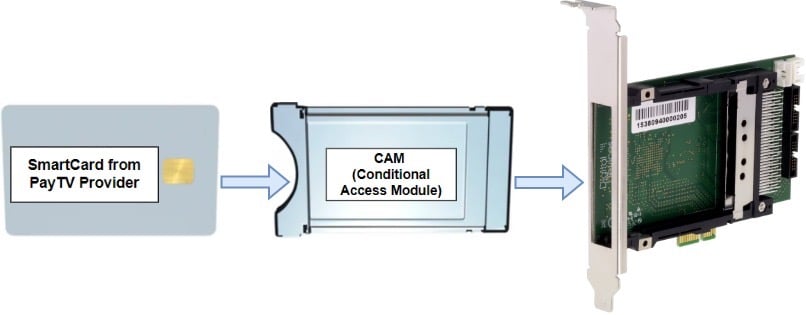
Astra Configuration
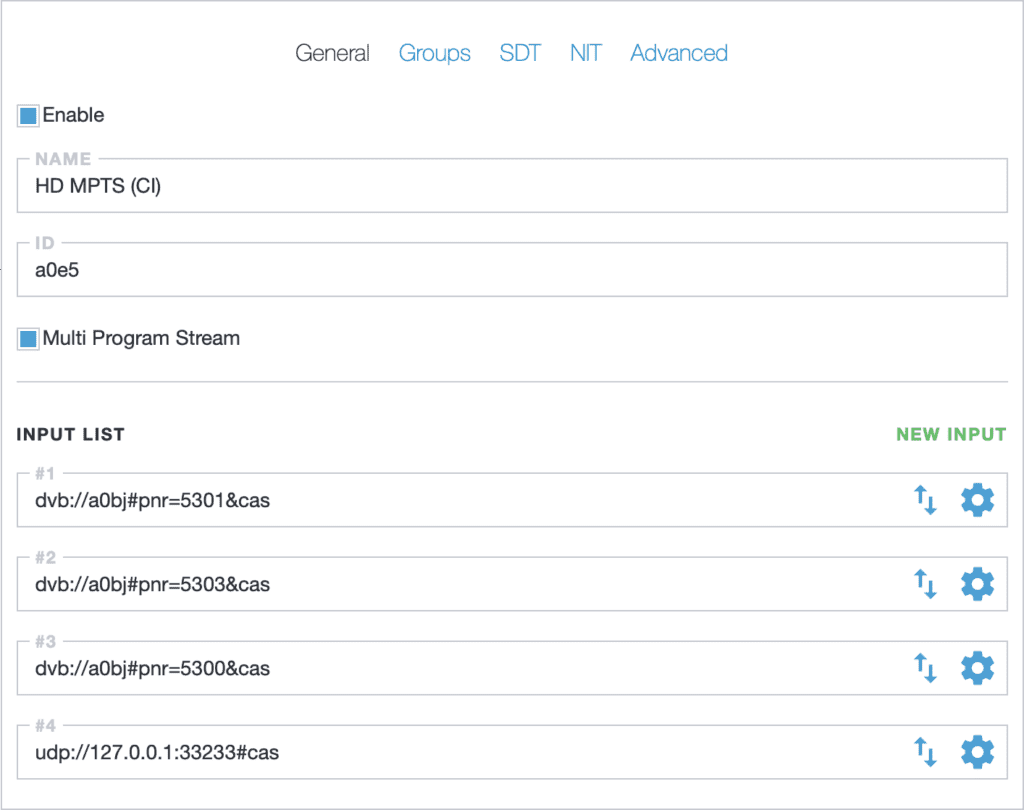
Create MPTS
Create MPTS with required channels in the input address for each channel you should append option cas – so that astra passes everything necessary for decoding. For instance:
Create Virtual Adapter

Virtual Adapter available for versions released after 20 Sep 2022
Create New Adapter in the Astra Web Interface with the CI value in the Virtual field. Save adapter settings by clicking the Apply button
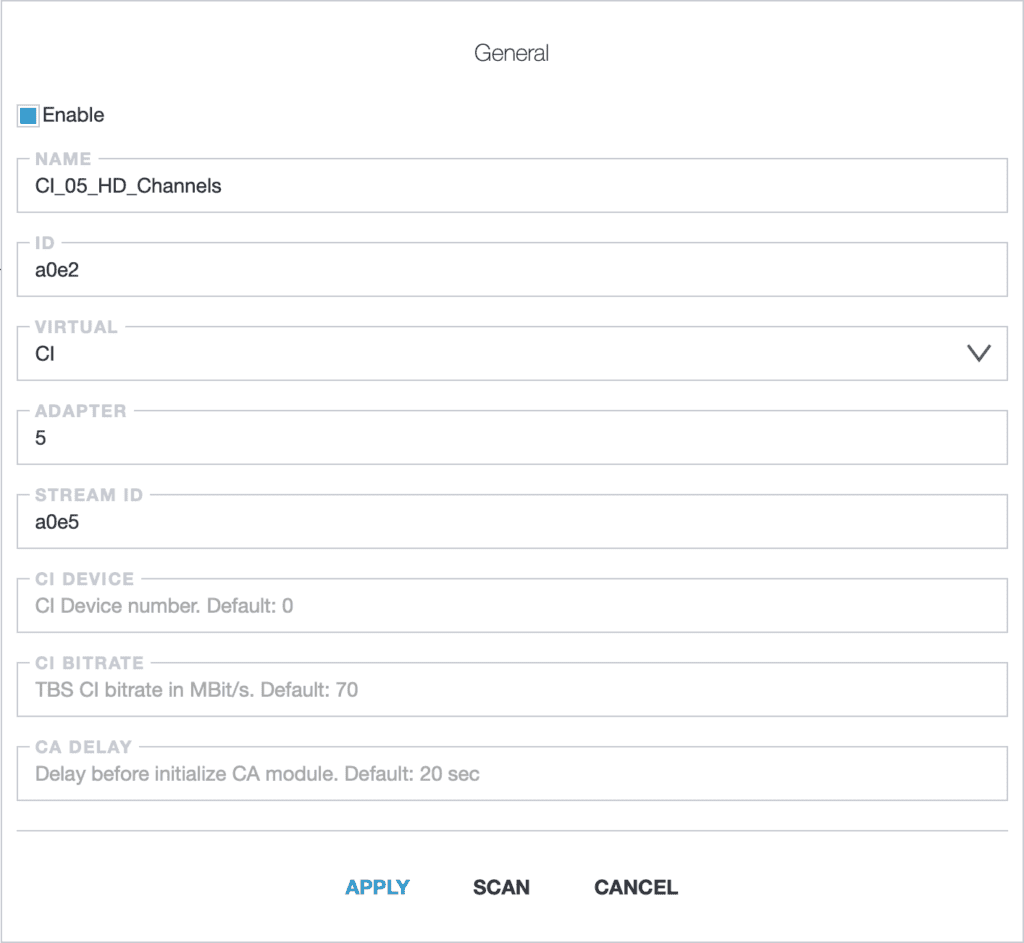
CI options:
- Name – name for Adapter
- ID – unique adapter identifier. You may leave it blank, the system will generate an id, when you save the adapter
- Virtual – Virtual Adapter type. select the CI option
- Adapter – number of the CI adapter in the system
- Stream ID – stream identifier with MPTS. it is an ID value of MPTS created on the first step
- CI Device – number of the device on the CI adapter. Default: 0
- CI Bitrate – TBS CI bitrate in MBit/s. Default: 70. For DigitalDevices bitrate could be defined in the driver settings
- CA Delay – delay, in seconds, before sending channel information to the Conditional Access Module. Default: 20 second
CI adapter number could be found with command:
find /dev/dvb/ -name ca*For example result will be:
/dev/dvb/adapter5/ca0Where:
- 5 – CI adapter number
- 0 – device on the CI adapter
Scan adapter
Now you can click the Scan button.
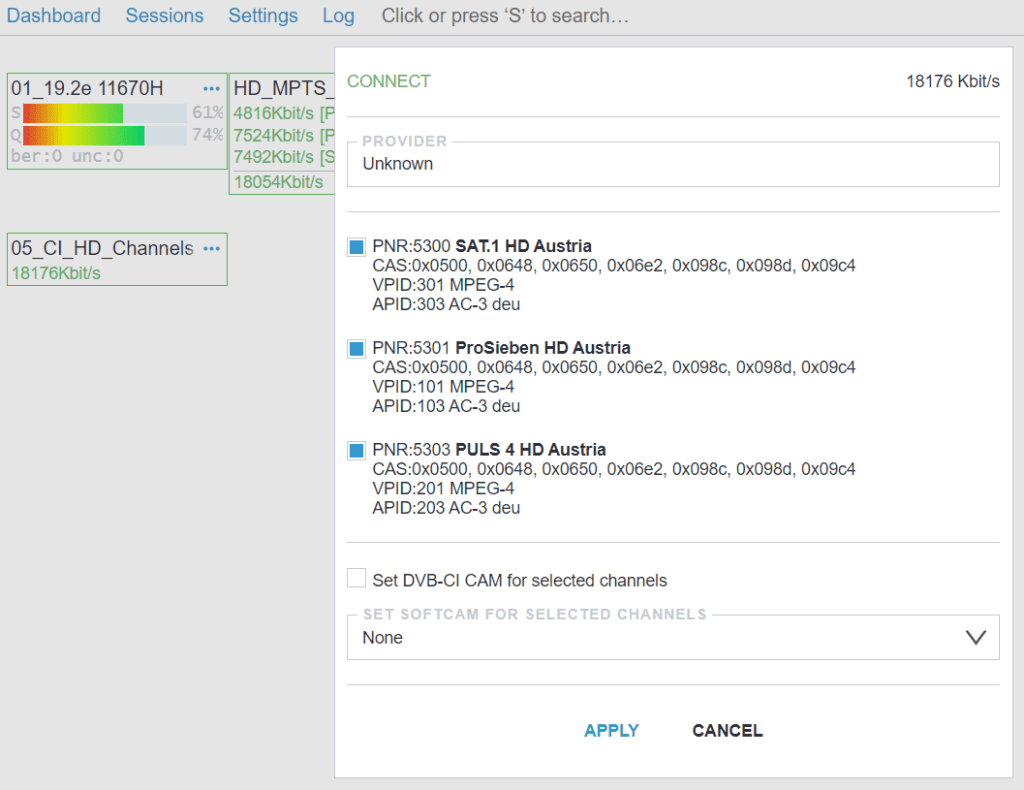
Select the required programs and append them by clicking on the Apply button.

Troubleshooting
CI+ Module not working
CI+ modules only for consumer use and don’t supported by the External DVB-CI adapters
Descrambled only 1 channel
The number of programs (channels) that CAM may descramble simultaneously, depending on CAM manufacturer and/or model
How to check CAM menu?
If you need to check CAM menu to get some additional data about Conditional Access Module or SmartCard, you may use gnutv digital tv utility. Launch:
gnutv -adapter N -cammenuWhere N is a CI adapter number.